
Tremorline user manual
Tremorline watches the APIs your application depends on. It tells you when one stops working, when its responses or its published contract change in a way that can break your integration, which lines of your own code are affected, and it can open the fix as a pull request.
Getting started
Uptime monitors answer “is it up?”. Tremorline also answers “does it still return what my code expects?”. You give it two kinds of things to watch:
- Endpoints: a URL of an API you call, for example
https://api.example-carrier.com/v2/rates?zip=10115. Tremorline calls it on a schedule, learns the structure of the JSON it returns, and reports fields that disappear, change type or start beingnull. - API specs: the provider’s published OpenAPI or Swagger document. Tremorline reports removed operations, new required parameters and changed response schemas, often before the change is live.
Connect your GitHub repositories and Tremorline also shows which places in your code a change affects.
Signing in
Open the app and sign in in one of two ways:
- Username and password, for the installation’s administrator account.
- Email me a sign-in link, where your installation offers it. Enter your work address and open the link in the email. The link works once and for 15 minutes; opening the page does not use it up, only clicking Sign in does. The first time you sign in, you get a workspace of your own.
You stay signed in for 14 days on that browser. Sign out is at the top right.
Trying the demo
The live demo signs you in as a visitor (demo / demo). It comes with eight example endpoints that show every kind of result, two example specs and example code in Java and TypeScript.
The examples watch a built-in “Demo Shop” API. The banner at the top says which version of its API the Demo Shop serves. Click Switch to version 2: the “Orders API” endpoint and the “Demo Shop API spec” are checked right away and, within a few seconds, report breaking changes together with the lines of example code that will break. Switch to version 1 goes back.
As a visitor you can look at everything and switch versions; nothing else can be changed.
The screen at a glance
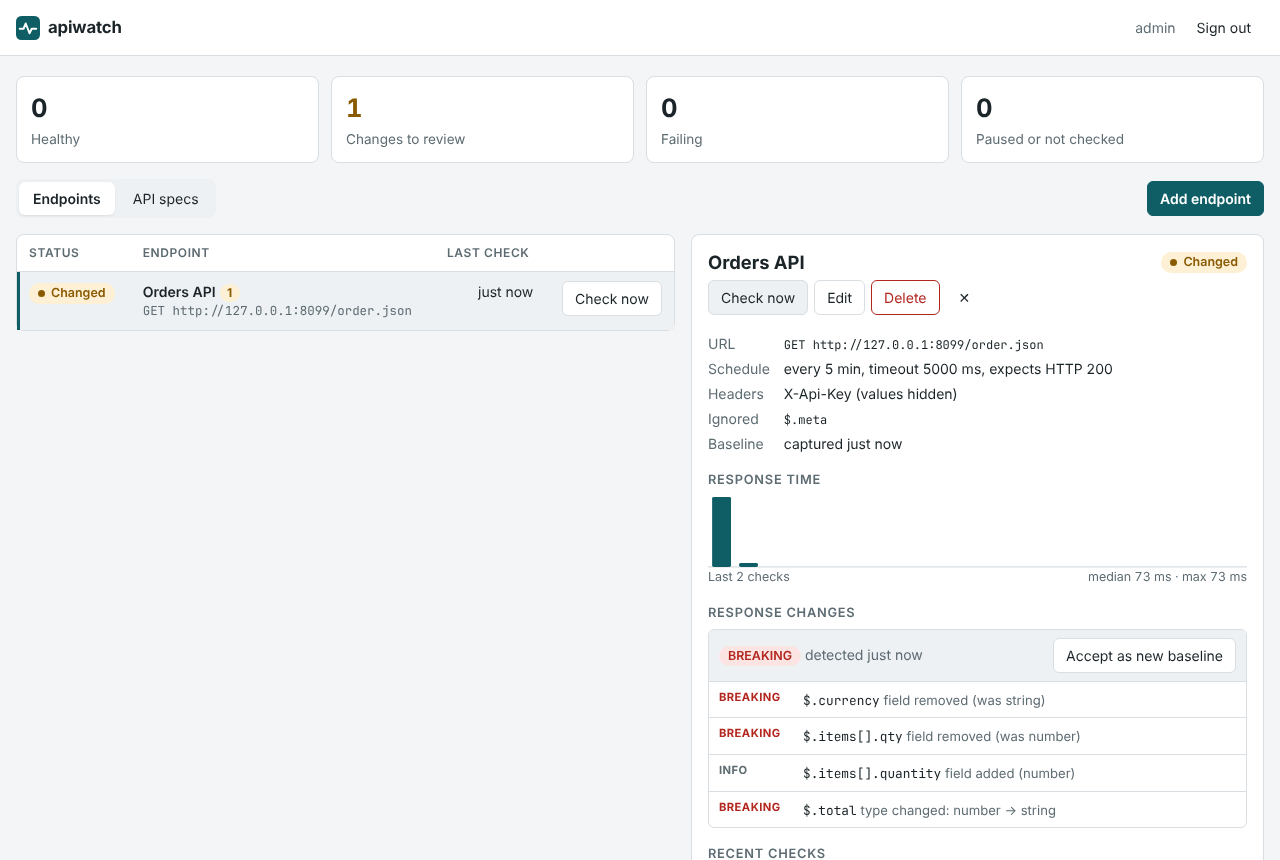
- Summary tiles at the top count everything you watch: Healthy, Changes to review, Failing and Paused or not checked.
- Tabs: Endpoints, API specs, Your code (repositories and AI models) and Alerts (where alerts go).
- The list shows each entry’s status, name, URL, when it was last checked and a Check now button. A number next to the name counts its open changes.
- The details panel opens when you click an entry. Close it with ✕.
The page refreshes itself every 15 seconds, so you can leave it open.
Monitoring endpoints
Adding an endpoint
- On the Endpoints tab, click Add endpoint.
- Give it a Name you will recognise in an alert, e.g. “Shipping rates”.
- Enter the URL, including any query parameters the call needs.
- If the API needs a key or token, add it under Request headers, one per line in the form
Name: value, e.g.X-Api-Key: 123…orAuthorization: Bearer …. - Adjust the schedule and thresholds if you like (see below), then click Add endpoint.
The first check runs right away, so the new entry shows a real status within seconds.
| Field | Default | What it does |
|---|---|---|
| Method | GET | GET or HEAD. Tremorline never sends anything else, so monitoring never changes data. Use HEAD when you only care about the status. |
| Expected status | 200 | Any other status is reported as Wrong status (401 and 403 as Auth failed). |
| Check every (seconds) | 300 | How often the endpoint is called. At least 30. |
| Timeout (ms) | 5000 | A call that takes longer counts as Unreachable. |
| Slow above (ms) | 2000 | Slower answers are marked “Slow” in the check’s details. |
| Alert after (failed checks) | 2 | How many failed checks in a row it takes before the status changes and an alert goes out, see Confirming failures. 1 alerts at the first failed check. |
| Ignore these paths | none | Parts of the response whose structure changes by design, see Ignoring parts of a response. |
| Run checks on schedule | on | Turn off to pause the endpoint. Check now still works. |
Header values are secret. They are stored encrypted and never shown again, not even to you. When you edit an endpoint, leave the headers box empty to keep the stored ones, type new ones to replace them, or tick Remove the stored headers.
What a check reports
Every check has one result:
| Result | Meaning |
|---|---|
| Up | Expected status, and the response matches its baseline. |
| Changed | Expected status, but the structure of the response changed in a way that can break clients (a breaking change or a warning). |
| Auth failed | HTTP 401 or 403: the API rejected your credentials. Check the key in the request headers. |
| Wrong status | Any other status than the expected one, e.g. 404 or 500. |
| Unreachable | DNS, connection or TLS errors, or the timeout ran out. |
A check also notes, in its details, when the response was slow, when the API marks the endpoint as deprecated (Deprecation or Sunset response headers), and when its TLS certificate expires within 14 days.
Confirming failures
A single dropped connection should not wake anyone up. When a check fails after a good one, the endpoint keeps its status and shows Re-checking. Tremorline checks it again 30 seconds later. Only when that check fails too does the status change and an alert go out. If the second check is fine, the failure is forgotten. The failed check still shows in Recent checks, marked “Not confirmed yet”.
Recovering needs no confirmation: the first good check after an outage sends “Recovered”. API specs work the same way: a spec needs two failed downloads in a row.
Deprecation, sunset and certificates
Some APIs announce that an endpoint will go away by sending Deprecation and Sunset headers. The first time an endpoint does, Tremorline sends one alert with the sunset date and a link to the provider’s notice, if the API gives one. If the provider later changes the date, you get another alert. The list then shows Sunset in 42 days (red when it is less than 14 days away), and the details panel shows the dates and the notice.
Tremorline also alerts 14 days and again 3 days before an endpoint’s TLS certificate expires. The list shows Certificate expires in 9 days from 14 days before. When the provider renews the certificate, the warnings start over for the new one.
How long checks are kept
Individual checks are kept for 30 days. Older days are kept as one summary per day: how many checks ran, how many were up, and the median, 95th-percentile and slowest response time (GET /api/endpoints/{id}/daily).
Baseline and response changes
The first successful check records a baseline: the structure of the JSON response, meaning its field names, their types, which fields are always present, and the shape of the elements in arrays. Values are never stored.
Every later check compares the structure it sees with the baseline. Each difference gets a severity:
| Difference | Severity |
|---|---|
| A required field was removed | BREAKING |
| A field’s type changed (e.g. number → string) | BREAKING |
A field can now be null | WARNING |
| A required field became optional, or an optional field was removed | WARNING |
A new field, or a field that is no longer null | INFO |
A breaking change or a warning sets the result to Changed, opens a change and sends one alert. Seeing the same difference again does not alert again. If the API goes back to its baseline structure by itself, the change closes by itself.
Reviewing a change
Click the endpoint and look at Response changes in the details panel. Each change lists the affected paths, such as $.items[].qty, what happened to them (e.g. type changed: number → string) and, if you connected a repository, the places in your code that use them.
Once your integration handles the new structure, click Accept as new baseline. The structure Tremorline observed becomes the new baseline, and the endpoint shows Up again from its next check (click Check now to see it right away).
Ignoring parts of a response
Some parts of a response vary by design, for example objects keyed by ID or free-form metadata. Add them under Ignore these paths, one per line, so they never count as a change:
$.meta
$.items[].attributes
Paths start at $ (the whole response); .name goes into a field and [] stands for every element of an array.
The details panel
- Facts: URL and method, schedule, timeout, expected status, the names of stored headers (not their values), ignored paths, when the baseline was captured, after how many failed checks it alerts, and, when they apply, the sunset date and when the certificate expires.
- Response time: a bar for each of the last 50 checks, with the median and maximum. Failed checks are shown as full-height red bars.
- Response changes: open changes and the three most recent resolved ones.
- Recent checks: the last 15 checks with result, HTTP status, time taken and details.
- Actions: Check now, Edit and Delete. Deleting asks once more (Delete for good or Keep) and also removes the endpoint’s history.
Monitoring API specs
Many providers publish an OpenAPI (3.x) or Swagger (2.0) document describing their API. Watching it tells you about a change as soon as it is documented, often before it reaches the live API.
- On the API specs tab, click Add API spec.
- Enter a name and the URL of the document (JSON or YAML). Add request headers if downloading it needs a key.
- Choose how often to download it: hourly by default, at most every 300 seconds.
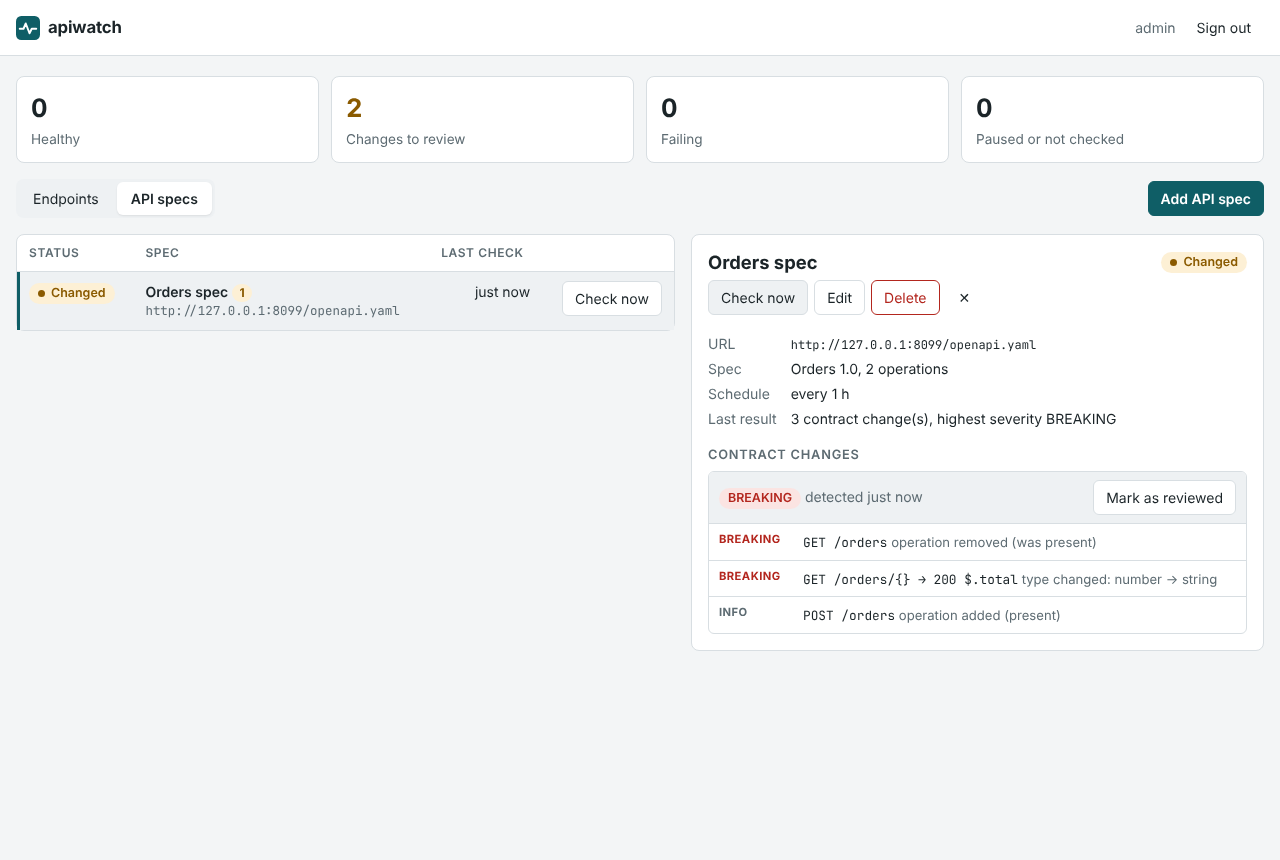
Tremorline extracts the contract (operations, query and header parameters, and response schemas, with $ref, allOf, oneOf and anyOf resolved) and compares it with the previous version:
| Difference | Severity |
|---|---|
| An operation was removed | BREAKING |
| A new required parameter, or an optional parameter became required | BREAKING |
| A response field was removed or changed type | BREAKING (same rules as for endpoints) |
| A parameter was removed, or a documented response status was removed | WARNING |
| A new operation, a new optional parameter, a new response field | INFO |
Unlike endpoints, the new version of a spec becomes the reference right away; the change stays open until someone clicks Mark as reviewed. Renaming a path parameter (/orders/{id} → /orders/{orderId}) is not reported. A document that cannot be downloaded or read shows Invalid spec, with the reason under Last result.
Not compared yet: request bodies and $refs that point to other files or URLs.
Impact on your code
Knowing that $.total changed from number to string is half the answer. The other half is where your code reads total. Connect your repositories and Tremorline finds those places for every change.
Connecting a repository
- On the Your code tab, click Connect repository.
- Enter the Repository as in its GitHub URL:
owner/repository. - Optionally enter a Branch; otherwise the default branch is used.
- For a private repository, enter an Access token: a GitHub fine-grained personal access token with read-only access to Contents of that repository. (For pull requests it needs more, see Fixes.)
- Click Connect. Tremorline reads the repository once to check that it can.
Each repository shows Connected (with the number of files and the commit it read), Not read yet or Cannot read with the reason. Every analysis uses the latest commit of the branch; Read again does it right now.
Code is downloaded on demand and kept in memory only. Tremorline stores only the lines it finds.
Reading the impact
When a change is found, Tremorline searches every connected repository for the changed fields and API paths: DTO fields, getters, TypeScript interfaces, JSON keys, property access and API calls. The result appears under each change:
- Code impact sums it up, e.g. “Affects 3 places in 3 files”.
- Under each changed path, the matching places are listed as
File.java:14with the line itself. Click the location to open it on GitHub. - A place marked probable is a likely but not certain match. A match is certain when the same file also uses the API’s path or neighbouring fields of the same object.
- Analyse again repeats the analysis, e.g. after you pushed a fix.
If no repository is connected yet, each change offers a Connect your repository link instead.
AI decision
Where the installation has the decision model switched on (the Your code tab says so under AI decision), each match is also judged by an AI decision model. It answers yes/no questions a reviewer could check by looking at the line: does it work with the changed field, does it rely on the old type, does it handle a missing value, would it throw without it, does it call the changed operation? From those answers each place gets a verdict:
| Verdict | Meaning |
|---|---|
| will break | This line fails with the new response, e.g. it parses a number that is now a string. |
| may misbehave | It probably keeps running but may do the wrong thing, or the model was not sure enough. |
| unaffected | It uses the field in a way the change does not break. |
| AI: unrelated | A same-named field that has nothing to do with this API. Hidden by default; Show … matches the AI judged unrelated lists them. |
The percentage next to a verdict is how sure the model is. Only the matching line and a few lines around it are sent to the model. The number of decisions per day is limited; the tab shows how many are used. When the limit is reached, or a call fails, the text search decides alone until the next day (midnight UTC), and the summary says how many places went undecided.
Fixes and pull requests Pro
With Pro, your own AI model rewrites the affected code and Tremorline opens the pull request. You keep control of your code and your AI costs.
Connecting your AI model
- On the Your code tab, under Your AI model for fixes, click Connect AI model.
- Choose the Provider: OpenAI-compatible (OpenAI, Azure OpenAI, Mistral, Groq, Ollama, vLLM and others) or Anthropic (Claude).
- Leave Base URL empty for the provider’s public API, or enter the API address of Azure, Mistral, your own Ollama server and so on.
- Enter the Model name exactly as the provider spells it, and your API key (not needed for local models without one).
- Click Save, then Test connection.
The API key is stored encrypted and never shown again; leave the field empty when editing to keep it.
Getting a fix
- Open a change that affects your code and click Suggest fixes with <your model>.
- Each affected file is sent to your model, one at a time. For each file you see the model’s explanation and a diff, or “No change needed in this file”.
- If you like the result, click Open pull request. Tremorline opens one pull request per repository, based on the commit that was analysed. View pull request takes you there.
- Not happy? Suggest again asks the model once more.
To open pull requests, the repository’s access token needs read and write access to Contents and Pull requests. Review every pull request like one from a colleague before merging it.
Alerts
Tremorline sends an alert when:
- an endpoint or spec starts failing (after a second failed check), or recovers;
- an API announces that an endpoint is deprecated or gets a sunset date;
- an endpoint’s TLS certificate expires in 14 days, and again in 3 days;
- a response or a spec changes in a way that can break clients (with the code impact, if repositories are connected).
Each workspace sends its alerts to one incoming webhook. Without one, alerts only show up in Tremorline itself.
Setting the webhook
- Open the Alerts tab and click Add webhook.
- Paste the webhook URL and click Save.
- Click Send test alert and check that it arrives.
Where to get the URL:
- Slack: create an app at api.slack.com/apps, turn on Incoming Webhooks and add a webhook for the channel. No app from us is needed.
- Microsoft Teams: add the Incoming Webhook connector to the channel.
- Anything else (n8n, Zapier, your own service): Tremorline posts JSON, see below.
The URL is stored encrypted and never shown again, because whoever has it can post into your channel; Tremorline only shows its host. Use Change webhook to replace it and Remove to stop sending alerts. Only owners of a workspace can change where its alerts go.
Payload
{
  "text": "…the alert as one readable message…",
  "endpointId": 1,
  "endpoint": "Shipping rates",
  "url": "https://api.example-carrier.com/v2/rates?zip=10115",
  "outcome": "UNREACHABLE",
  "previousOutcome": "UP",
  "details": "Connection refused",
  "at": "2026-10-25T09:41:00Z"
}
Slack and Teams show the text field; other tools can use the separate fields.
Workspaces and roles
Endpoints, specs, connected repositories, their changes and the alert webhook belong to a workspace. Nobody outside a workspace can see what is in it. Everyone who signs in by email gets a workspace of their own and owns it.
| Role | Can do |
|---|---|
| Owner | Everything, including setting where alerts go. |
| Member | Add, change and remove endpoints, specs and repositories; run checks; accept and review changes; ask for fixes. |
| Viewer | Look at everything. Buttons that change something are hidden. |
Inviting people into a workspace and switching between workspaces are not available in the app yet. Until then, ask your installation’s administrator.
Using the API
Everything the app does is also available as a JSON API under /api, for scripts and automation. Scripts sign in with HTTP Basic, using the administrator account (accounts that sign in by email have no password, so they use the app; personal API tokens are planned). Errors use the standard application/problem+json format.
# Watch an API that needs an API key
curl -u admin:PASSWORD -X POST https://app.tremorline.com/api/endpoints \
  -H 'Content-Type: application/json' -d '{
  "name": "Shipping rates",
  "url": "https://api.example-carrier.com/v2/rates?zip=10115",
  "headers": { "X-Api-Key": "..." },
  "intervalSeconds": 300,
  "ignoredPaths": ["$.meta"]
}'

# Watch the provider's published spec
curl -u admin:PASSWORD -X POST https://app.tremorline.com/api/specs \
  -H 'Content-Type: application/json' -d '{
  "name": "Carrier API spec",
  "url": "https://api.example-carrier.com/openapi.yaml"
}'

# Run a check now, then see what changed
curl -u admin:PASSWORD -X POST https://app.tremorline.com/api/endpoints/1/check
curl -u admin:PASSWORD https://app.tremorline.com/api/endpoints/1/changes
A change looks like this:
{
  "id": 3,
  "severity": "BREAKING",
  "resolved": false,
  "changes": [
    { "path": "$.price", "kind": "FIELD_REMOVED", "severity": "BREAKING", "before": "number", "after": null },
    { "path": "$.items[].qty", "kind": "TYPE_CHANGED", "severity": "BREAKING", "before": "number", "after": "string" },
    { "path": "$.totalPrice", "kind": "FIELD_ADDED", "severity": "INFO", "before": null, "after": "number" }
  ]
}
Endpoints
| Method | Path | Description |
|---|---|---|
| GET | /api/endpoints | List endpoints with their last result |
| POST | /api/endpoints | Add an endpoint |
| GET, PUT, DELETE | /api/endpoints/{id} | Read, update or remove an endpoint (PUT without headers keeps the stored ones) |
| POST | /api/endpoints/{id}/check | Run a check now |
| GET | /api/endpoints/{id}/results?limit=50 | Check history (the last 30 days) |
| GET | /api/endpoints/{id}/daily?days=90 | One summary per day for older days |
| GET | /api/endpoints/{id}/changes | Response changes |
| POST | /api/endpoints/{id}/changes/{changeId}/accept | Accept as new baseline |
| GET, DELETE | /api/endpoints/{id}/baseline | Show or reset the baseline |
Fields: name, url, method (GET, HEAD), headers, expectedStatus, intervalSeconds, timeoutMs, slowThresholdMs, ignoredPaths, enabled.
API specs
| Method | Path | Description |
|---|---|---|
| GET, POST | /api/specs | List or add specs |
| GET, PUT, DELETE | /api/specs/{id} | Read, update or remove a spec |
| POST | /api/specs/{id}/check | Download and compare now |
| GET | /api/specs/{id}/changes | Contract changes |
| POST | /api/specs/{id}/changes/{changeId}/acknowledge | Mark as reviewed |
Fields: name, url, headers, intervalSeconds, enabled.
Alerts
| Method | Path | Description |
|---|---|---|
| GET | /api/workspace | The workspace and where its alerts go |
| PUT, DELETE | /api/workspace/webhook | Set ({"url": "…"}) or remove the webhook |
| POST | /api/workspace/webhook/test | Send a test alert |
Reference
Statuses
| In the app | In the API | Meaning |
|---|---|---|
| Up | UP | Working as expected |
| Changes to review | UP with open changes | Working, but a change is still open (e.g. a spec change nobody has reviewed) |
| Changed | DRIFT | The response structure differs from the baseline |
| Auth failed | AUTH_FAILED | HTTP 401 or 403 |
| Wrong status | UNEXPECTED_STATUS | Not the expected HTTP status |
| Unreachable | UNREACHABLE | Network or TLS error, or timeout |
| Invalid spec | INVALID_SPEC | The spec could not be downloaded or read |
| Paused | enabled: false | Not checked on schedule |
| Not checked yet | no lastOutcome | Waiting for its first check |
| Re-checking | recheckAt set | The last check failed; it is checked again before the status changes |
Kinds of change
| Kind | Found in | Severity |
|---|---|---|
FIELD_REMOVED | Endpoints, specs | BREAKING if the field was required, else WARNING |
TYPE_CHANGED | Endpoints, specs | BREAKING |
BECAME_NULLABLE | Endpoints, specs | WARNING |
FIELD_BECAME_OPTIONAL | Endpoints, specs | WARNING |
FIELD_ADDED, FIELD_BECAME_REQUIRED, NO_LONGER_NULLABLE | Endpoints, specs | INFO |
OPERATION_REMOVED | Specs | BREAKING |
OPERATION_ADDED | Specs | INFO |
PARAMETER_ADDED | Specs | BREAKING if required, else INFO |
PARAMETER_BECAME_REQUIRED | Specs | BREAKING |
PARAMETER_REMOVED | Specs | WARNING |
PARAMETER_BECAME_OPTIONAL | Specs | INFO |
RESPONSE_REMOVED | Specs | WARNING |
RESPONSE_ADDED | Specs | INFO |
Settings and limits
| Setting | Endpoints | API specs |
|---|---|---|
| Check interval | 300 s by default, at least 30 s | 3600 s by default, at least 300 s |
| Timeout | 5000 ms by default, 100–60000 ms | – |
| Slow threshold | 2000 ms | – |
| Size | Responses above 5 MB are checked for their status only | Documents above 10 MB are rejected |
| Requests sent | GET or HEAD only | GET |
These are the defaults; your installation’s administrator can change the size limits.
Troubleshooting
- A field shows up as a warning although nothing changed.
- The baseline comes from a single response. A field that is only sometimes present, or only sometimes
null, looks like a change the first time it differs. Accept the change (the baseline then knows the field can be missing ornull) or add the path to Ignore these paths. - Every check reports a change in the same part of the response.
- That part varies by design, e.g. an object keyed by IDs. Ignore it, e.g.
$.pricesor$.items[].attributes. - The endpoint shows “Auth failed”.
- The API rejected the credentials. Edit the endpoint and enter the request headers again; stored values cannot be shown, so retype the whole header.
- The endpoint shows “Wrong status” but works in my browser.
- Check Expected status (some APIs answer 204 or 202) and whether the browser sends a cookie or header that Tremorline does not.
- The spec shows “Invalid spec”.
- Last result says why. Make sure the URL returns the raw OpenAPI or Swagger document (JSON or YAML), not a documentation page that renders it.
- A repository shows “Cannot read”.
- Check the spelling (
owner/repository), the branch, and for private repositories that the token has read access to Contents and has not expired. Then click Read again. - The code impact lists a line that has nothing to do with the API.
- The text search matches field names, so a same-named field on another object can show up. Where the AI decision is switched on, such matches are usually filtered out as unrelated.
- Opening a pull request fails.
- The token needs read and write access to Contents and Pull requests. Edit the repository and enter a token with those permissions.
- The test alert does not arrive.
- The message under the buttons shows what the webhook answered. Check that the URL is complete and that the Slack app or Teams connector is still installed in the channel.
Your data
- Response bodies are not stored, only their structure (field names and types).
- Secrets are encrypted: request headers, access tokens, AI API keys and the webhook URL are stored with AES-256-GCM and never shown again.
- No side effects: only
GETandHEADrequests are sent to the APIs you monitor. - Your code is read on demand and kept in memory; only the affected lines are stored. For the AI decision, only the matching line and a few around it are sent. For fixes, only the affected files go to the AI model you connected, and only when you ask.
- Workspaces are separate: nobody outside your workspace sees its endpoints, specs, repositories or changes.